



Business Reactor Service
Frequently asked questions about connecting Business Reactor Click to open answers about demo access and subscription +
Here are short answers to the main questions before starting a demo or connecting the system.
How quickly is the system activated after a request? +
During working hours, activation usually takes from 2 to 3 hours.
This applies both to demo access and to a paid subscription.
How quickly will I get access to the 7-day demo? +
After the request is confirmed, demo access is usually opened within 2–3 hours during working time.
If the request is left in the evening or on a weekend, activation moves to the next working period.
When are requests processed and the system launched? +
Requests are processed from Monday to Friday, from 9:00 to 19:00.
Demo access and the working subscription are activated during this time.
Do I need to prepare anything complicated in advance? +
No. At the start, no complex technical preparation is required.
We prepare access and help you go through the first launch in a clear way.
Do you help with the first launch and orientation in the system? +
Yes. If needed, we connect a manager and help you start without confusion.
This is useful if you want to understand the system logic faster and see the main working points.
What happens after the subscription is paid? +
After payment is confirmed, the system is also launched within an average of 2–3 hours during working time.
After that, you receive access and can start working without a long wait.


 ApplePay
 payment on account
 In cash
Business Reactor Service is an operational module for companies that sell time, expertise or the completion of specific work. It brings customer bookings, calendar planning, services, performers, workplaces, equipment and materials into one workflow. Managers can see workload, the team understands what comes next, and order information no longer gets lost across chats, spreadsheets and disconnected tools.
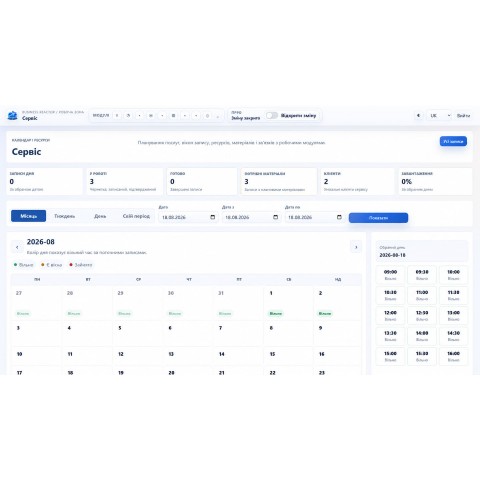
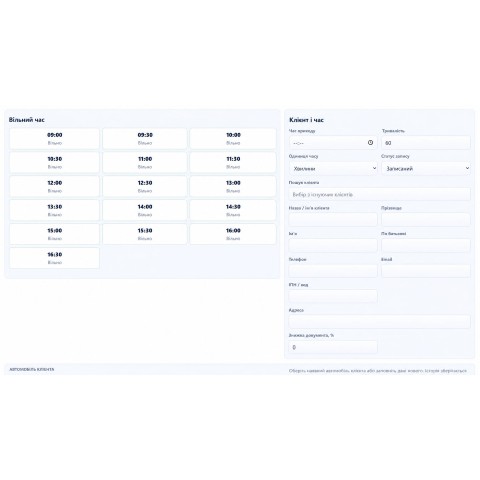
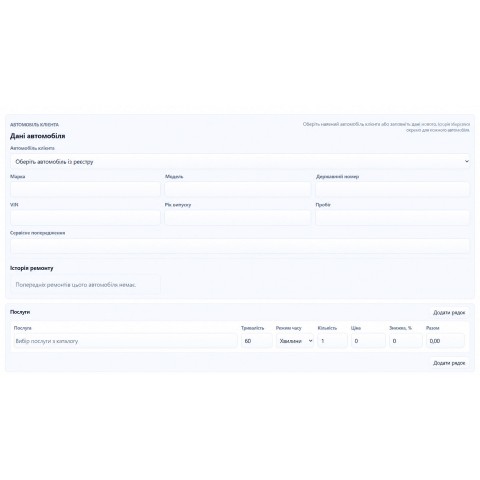
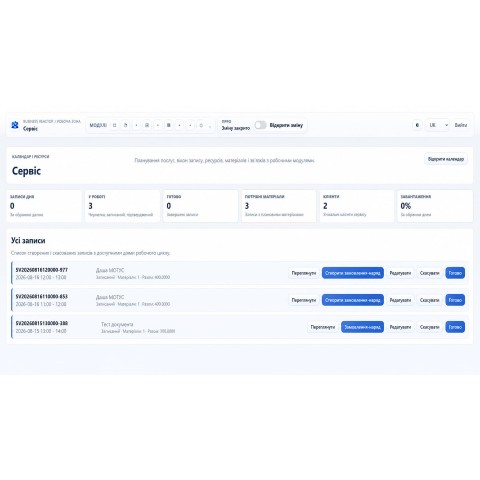
The module adds a complete service CRM workflow to Business Reactor. Every enquiry can become a booking with a time slot, responsible performer and required resource. A booking can include services, duration, price, discount and materials. Day, week, month and custom-period calendar views keep planning clear for both a small team and an operation with multiple performers.
ONE WORKFLOW FROM BOOKING TO COMPLETION
• create a booking and link it to a customer;
• select services, duration, price and discount;
• assign an employee, workplace or equipment;
• control status and actual workload;
• add materials, parts and consumables;
• create a work order through the connected accounting module.
Statuses make planned, active and completed work easy to distinguish. The live module screen shows the calendar and resources, free intervals, occupied bookings and operational labels. It is the real Business Reactor interface, not a conceptual mock-up.
BUILT FOR DIFFERENT SERVICE MODELS
Service works for repair workshops, salons, cleaning and installation companies, training centres, consultants, field service teams and other organisations that accept bookings or perform ordered work. Services, performer roles and resource types can be configured around the company’s actual process.
Automotive business is one possible use case, not the sole purpose of the module. It can add an extended vehicle card with VIN, registration number, mileage, service warnings and maintenance history. The same core logic for bookings, resources, materials and completion control remains useful across other service industries.
RESOURCES, MATERIALS AND WORKLOAD
A resource does not have to be an employee. The module can schedule a workplace, room, bay, tool or equipment required to deliver a service. Materials and parts are attached to the work, while the calendar helps prevent double-booking and idle capacity.
CONNECTED TO BUSINESS REACTOR
Service is part of the modular Business Reactor ERP/CRM. When needed, it connects with product and inventory management, finance, documents, analytics and other system modules. A company can begin with service operations and expand automation without moving its customers or work history to another product.
There are no reviews for this product, be the first to leave your review.
No questions about this product, be the first and ask your question.