



AutoParts module for Business Reactor
Frequently asked questions about connecting Business Reactor Click to open answers about demo access and subscription +
Here are short answers to the main questions before starting a demo or connecting the system.
How quickly is the system activated after a request? +
During working hours, activation usually takes from 2 to 3 hours.
This applies both to demo access and to a paid subscription.
How quickly will I get access to the 7-day demo? +
After the request is confirmed, demo access is usually opened within 2–3 hours during working time.
If the request is left in the evening or on a weekend, activation moves to the next working period.
When are requests processed and the system launched? +
Requests are processed from Monday to Friday, from 9:00 to 19:00.
Demo access and the working subscription are activated during this time.
Do I need to prepare anything complicated in advance? +
No. At the start, no complex technical preparation is required.
We prepare access and help you go through the first launch in a clear way.
Do you help with the first launch and orientation in the system? +
Yes. If needed, we connect a manager and help you start without confusion.
This is useful if you want to understand the system logic faster and see the main working points.
What happens after the subscription is paid? +
After payment is confirmed, the system is also launched within an average of 2–3 hours during working time.
After that, you receive access and can start working without a long wait.


 ApplePay
 payment on account
 In cash
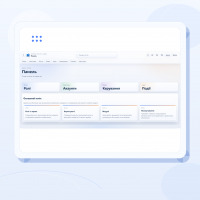
AutoParts is a Business Reactor industry module with a ready automotive parts registry. The company receives more than an empty product catalogue: it gets an information foundation containing millions of components, original numbers, cross-references, alternatives and photos. Sales and inventory work can begin without years of manual data entry.
What AutoParts already contains
- millions of automotive component records;
- manufacturer original numbers;
- cross-reference numbers and related replacements;
- alternatives from different brands;
- product photos;
- manufacturers, categories and essential attributes;
- a connection between the product record, internal stock, warehouses and suppliers.
Employees do not recreate the same reference information. They find an existing position and add business-specific data such as price, stock, storage location, supplier and sales rules.
How an employee finds a component
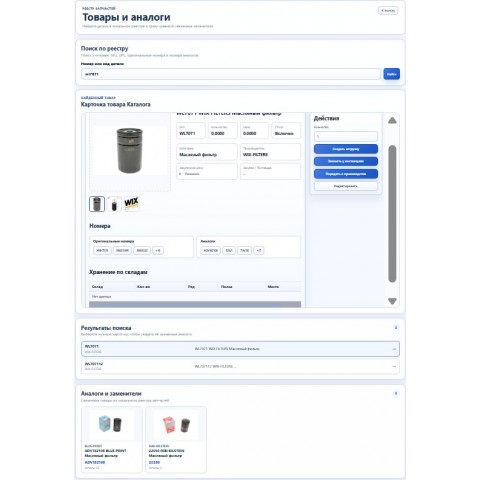
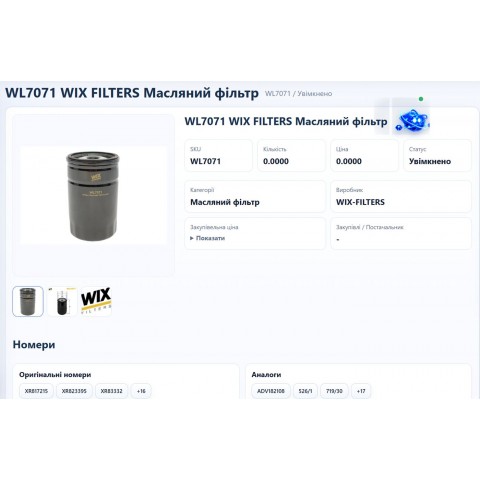
The registry search considers SKU, UPC, original numbers and alternative numbers. After selecting a result, the employee sees the product record, images, manufacturer, category, related numbers and replacements. The result does not have to be copied into another program: it can be used in a Business Reactor order, shipment, purchase or production process.
Originals, cross-references and alternatives in one screen
If the requested brand is unavailable, related options appear immediately. Instead of ending the conversation with “out of stock,” the employee can offer a suitable alternative. Photos and numbers provide an additional check before the order is confirmed.
Internal warehouses and suppliers
AutoParts works with the Business Reactor inventory and sales areas. The record shows internal availability and storage location. Imports from Vladislav, AvtoTechnik, BusMarket and other connected suppliers add their available offers, with supplier stock updated automatically every night.
The employee does not switch between dozens of supplier sites and applications to check every warehouse. Search, availability, item selection and order creation remain in one workspace.
What the business gains
- thousands of hours saved on product record creation;
- faster customer replies and order preparation;
- fewer errors caused by manually copying article numbers;
- the ability to sell alternatives when the original is unavailable;
- a connected catalogue, inventory, suppliers, customer and order;
- one consistent workflow for new employees;
- a current view of products and order movement for the owner.
Who AutoParts is for
Auto parts stores receive a ready catalogue and faster employee selection. Repair shops can add identified components to repairs and work orders. Auto dismantlers use the registry as the reference foundation for individual used-part records with actual condition and storage location.
How AutoParts works with VIN selection
The VIN selection module identifies the vehicle, category, assembly and OEM position. AutoParts then finds the related product records, cross-references and alternatives. The modules can work together while remaining separate products: AutoParts manages the registry and product relationships, while the VIN module handles vehicle identification and OEM selection.
How to begin
The company uploads its own stock, connects the required supplier sources and configures pricing, warehouses and order rules. The team can then work in the system. There is no need to build millions of reference records from zero.
There are no reviews for this product, be the first to leave your review.
No questions about this product, be the first and ask your question.